What is Benchmark Testing: Types, Process, and Best Practices

Benchmark testing measures an application's performance against a reference point, such as a previous release, a target, an industry standard, or a competitor. It helps teams determine whether performance has improved, declined, or remained stable.
Performance issues often develop gradually. Small code changes or heavier assets can introduce slowdowns that go unnoticed without a baseline for comparison.
Benchmark testing helps teams track performance across releases, set measurable targets, and evaluate technical changes. This guide covers its types, process, key metrics, sample test cases, best practices, tools, and how HeadSpin supports benchmarking.
What Is Benchmark Testing?
Benchmark testing in software testing is a way of measuring an application's performance under controlled, repeatable conditions and comparing the results against a baseline. It looks at things like speed, stability and resource use. A few terms make the idea easier to follow.
- Benchmark. The standard you compare against, such as a previous release, a service level target, an industry figure or a competitor's result.
- Baseline. The set of measurements taken from a known good version under known conditions. Future results are compared to it.
- Controlled conditions. The same hardware, network, data and workload on every run, so any difference comes from the software and not the setup.
Benchmark software testing is often described as a subset of performance testing. Performance testing explores how a system behaves under different loads and finds its limits. Benchmark testing is narrower and more repeatable. It runs the same tests each time to see whether results are moving in the right direction.
Why Is Benchmark Testing Important?
Benchmark testing gives teams a reliable way to track performance over time instead of relying on guesswork.
1. Catches Regressions Early When a build performs worse than the baseline, teams can identify the slowdown while the cause is still easier to investigate.
2. Sets Clear, Realistic Targets Instead of vague goals like "make it fast," teams can set measurable targets, such as keeping the login API response time under 300 ms at the 95th percentile.
3. Guides Technical Decisions Benchmarks show whether a new database, library, cloud setup, or device configuration improves or reduces performance.
4. Improves User Experience Speed and responsiveness affect how users experience an application. Benchmarks help teams maintain consistent performance as the product evolves.
5. Enables Competitive Comparisons Comparing application performance against competitors helps teams identify gaps that internal testing alone may not reveal.
6. Supports Release Decisions Comparing results against agreed performance thresholds helps teams decide whether a build is ready for release or requires further optimization.
7. Prevents Costly Surprises Identifying performance slowdowns during testing helps teams address them before they affect customers.
Types of Benchmark Testing
Benchmark tests can be grouped by what they measure. Many teams combine two or three types in a single plan.
1. Application Benchmarking This type measures how a web or mobile app performs on key flows such as login, search or checkout, and compares the results with earlier versions or targets.
- Page load and screen render times
- API response times
- Behavior across devices, browsers and operating systems
2. Network Benchmarking Network benchmarking measures how data moves between users and servers, whether on a local network, across a wide area network or over mobile data.
- Latency and bandwidth
- Packet loss and jitter
- Behavior on 3G, 4G, 5G and Wi-Fi conditions
3. Hardware Benchmarking Hardware benchmarking measures how components such as the CPU, GPU, memory and battery perform. It helps decide whether infrastructure or devices can support the software.
- Processing speed under load
- Memory use and leaks
- Battery drain and heat on mobile devices
4. Database Benchmarking Database benchmarking looks at how well a database handles queries and concurrent users.
- Query times and slow queries
- Indexing effectiveness
- Connection handling under peak load
5. System Benchmarking System benchmarking evaluates servers, software, network and hardware working together. It's useful for end-to-end workflows and for finding which layer is the bottleneck.
- Full user flows from request to response
- Resource limits across the stack
- Behavior after infrastructure or configuration changes
6. Storage Benchmarking Storage benchmarking checks how quickly data can be read and written on disks, SSDs and storage networks.
- Read and write speed
- Input and output operations per second
- Latency and queue depth
7. UX Benchmarking UX benchmarking tracks how easy and pleasant an app is to use, and compares that against earlier versions or competitors. It mixes performance numbers with user-focused measures.
- Task success rate and time on task
- Error rates during key tasks
- Satisfaction scores such as the System Usability Scale or Net Promoter Score
- Perceived speed, such as how quickly useful content appears on screen
8. Competitive Benchmarking Competitive benchmarking measures your app against comparable apps in the same market using the same tests, devices and networks.
- App launch and load times compared with rivals
- Video start time and smoothness for streaming apps
- Performance by region
Benchmarks can also be organized by workload, such as steady performance, expected peak load, stress beyond limits and scalability as resources grow. A practical plan often pairs one scope from the list above with one workload type.
How to Perform Benchmark Testing: A Step-by-Step Process
A clear process keeps results comparable from one run to the next.
1. Define the Objective Decide what question the test should answer. Examples include "Did the new release slow down checkout?" or "How does our app launch time compare with the top three competitors?"
2. Choose What to Test Pick the components, pages, APIs or user flows that matter most, such as login, search, payment or video playback. Start small and expand once the process works.
3. Select Metrics and Targets Choose the measurements that answer your question, such as response time, throughput, error rate and CPU use. Write down what a pass looks like, for example "95th percentile response time under 300 ms with under 1% errors".
4. Set the Baseline Run the tests on a known good version under normal conditions, and record the results. This becomes the reference point for every later run.
5. Prepare a Realistic, Repeatable Environment Match production as closely as you can in hardware, configuration, network and data. Keep it identical between runs, and note anything that could affect results, such as caches, background jobs or software versions.
6. Create Test Scripts and Data Build scripts for the flows you chose, using realistic data and user behavior. Keep scripts under version control so the same test runs each time.
7. Run the Tests Run each test several times, since a single run can be thrown off by noise. Add load gradually if the benchmark involves concurrency, and record the exact conditions.
8. Compare Results with the Baseline Look at medians and percentiles, not just averages. Decide whether a difference is real or within normal variation, and read response time alongside throughput, errors and resource use.
9. Analyze, Fix and Retest Trace slowdowns to their cause, whether that's code, a database query, a network issue or hardware. After a fix, rerun the same test under the same conditions to confirm the improvement.
10. Report and Repeat Share results in a form people can read, such as dashboards and trend charts. Run the benchmark on a schedule or with every build so the baseline stays useful.
What Metrics Should You Measure in Benchmark Testing?
The right metrics depend on what you're benchmarking. These are the ones used most often.
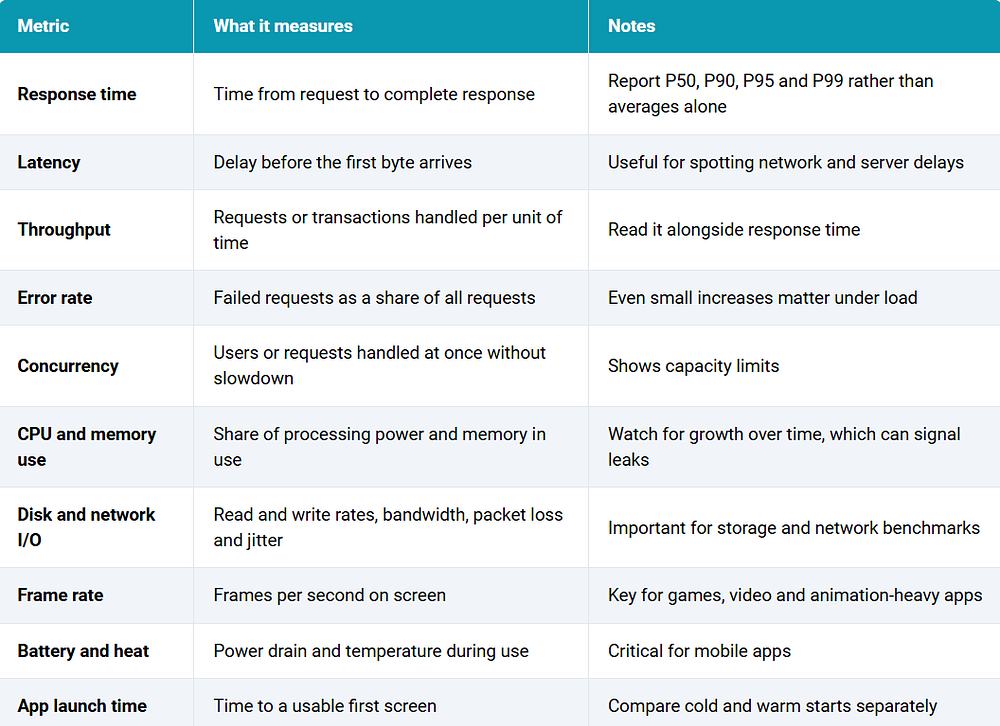
Web and UX Metrics For web experiences, add these user-focused measures.
- Largest Contentful Paint, which tracks how quickly the main content appears
- Interaction to Next Paint, which tracks how quickly the page responds to input
- Cumulative Layout Shift, which tracks unexpected movement of content
- Task success rate, time on task and satisfaction scores for UX benchmarks
Pick a small set of metrics that match your goal. Too many measures make results hard to read.
Benchmark Testing vs Performance Testing
The two are closely related, and people often mix them up. The easiest way to separate them is by the question each one answers.
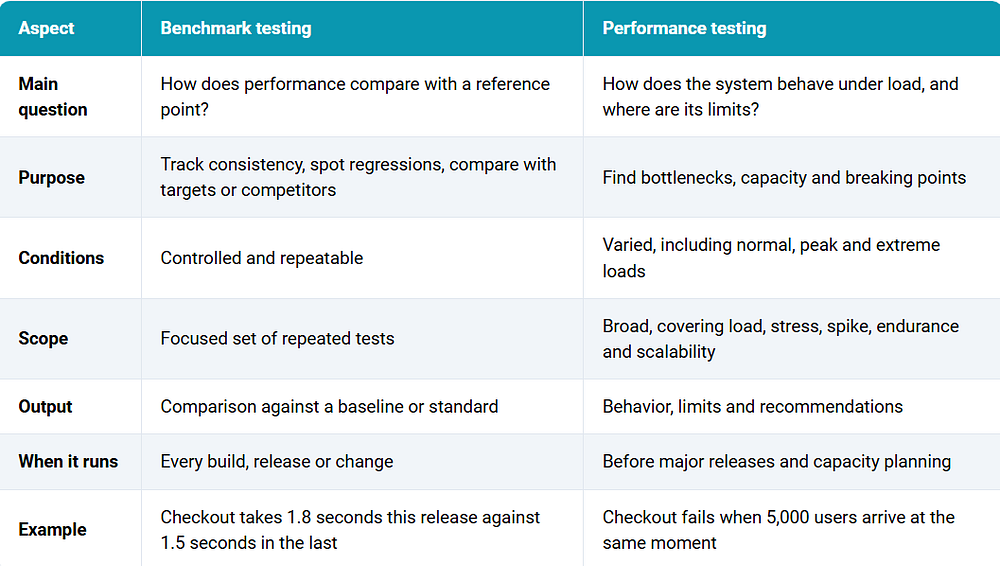
In practice they work together. Performance testing tells you what your system can handle. Benchmark testing makes sure it keeps performing at that level as the product changes.
Benchmark Testing Examples and Sample Test Cases
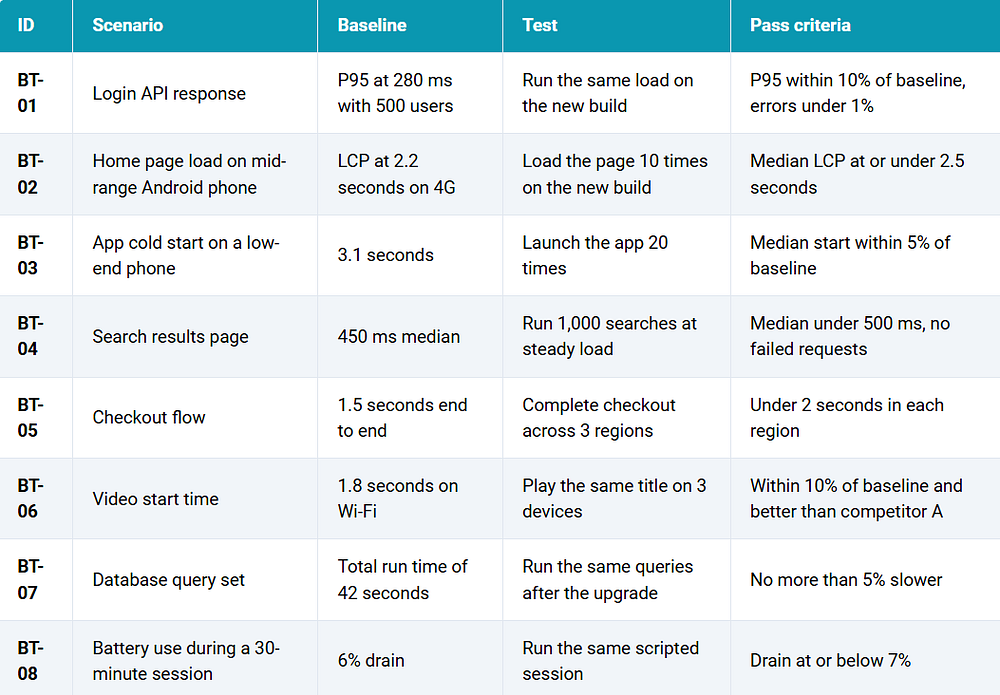
These examples show how benchmarks look in real projects. Targets are samples, so replace them with your own numbers.
Examples
- E-commerce checkout. A retailer records the time to complete checkout in each release and flags any version that is more than 10% slower than the baseline.
- Mobile banking app. A bank compares login and balance screen load times across phone models and networks after every sprint.
- Streaming service. A team compares video start time and buffering on the same devices against two competing apps.
- API change. A team checks that a refactored search API still returns results within the same percentile targets at the same load.
- Database upgrade. An engineering team runs the same query set before and after a database upgrade to confirm nothing slowed down.
Sample Test Cases
What Are the Challenges of Benchmark Testing?
1. Inconsistent Environments Small differences in hardware, software versions, network or background load can change results more than the code does. Without control, comparisons mislead.
2. Unrealistic Workloads and Data A benchmark built on tiny data sets or unrealistic user behavior can look great and still miss real problems. Workloads should reflect how people actually use the product.
3. Network and Device Variation Mobile networks and devices change from moment to moment and place to place. A test on a fast office connection and a flagship phone doesn't represent most users.
4. Noise Versus Real Regressions Results vary naturally from run to run. Teams need repeated runs and an agreed margin so they don't chase false alarms or miss real slowdowns.
5. Cache and Warm-Up Effects First runs and later runs can behave very differently. Mixing cold and warm results hides what users experience, so they should be recorded separately.
6. Looking at a Single Metric A faster response time may come with more errors or higher CPU use. Reading metrics together gives a truer picture.
7. Fair Competitive Comparisons Comparing against other apps only works if the tests use the same devices, networks, accounts and steps. Anything else tilts the result.
8. Cost and Slow Feedback Large benchmarks take time and resources. Teams often need smaller checks on every build and fuller runs before releases.
Benchmark Testing Best Practices for QA Teams
1. Start with a Clear Goal Know what decision the benchmark will inform before you design it. That keeps the scope small and the results useful.
2. Use Production-Like Environments Match infrastructure, configuration and data to production as closely as possible. Containers and infrastructure as code make environments easier to reproduce.
3. Keep Conditions Identical Between Runs Change only the thing you're testing. Record versions, settings, devices and network conditions with every result.
4. Use Realistic Data and Scenarios Build tests from real user journeys and anonymized production data, with a variety of requests and inputs.
5. Run Tests More Than Once Use several runs and report medians and percentiles. This reduces the effect of random spikes.
6. Report Percentiles, Not Just Averages Averages hide the slow experiences that frustrate users. P95 and P99 show what the worst-affected users see.
7. Separate Cold and Warm Results Measure first launches and repeat visits separately, since users experience both.
8. Test on Real Devices and Networks Emulators and fast office networks hide real-world problems. Include the phones and connections your users have.
9. Automate and Run in CI/CD Run small benchmarks on every build and bigger ones on a schedule. Automated comparisons against the baseline catch regressions the same day they appear.
10. Refresh Baselines Deliberately Update the baseline when you intentionally improve performance or change the product, and note why. Don't let it drift silently.
11. Archive Results Keep reports, logs and raw data so you can compare across months and investigate when something changes.
12. Keep Humans in the Loop Tools produce numbers, but people decide what's acceptable, design the scenarios, and judge whether a change matters.
Benchmark Testing Tools
The right tool depends on what you're measuring. The list below covers open source options first, with HeadSpin last.
1. Apache JMeter JMeter is a long-running open source tool for load and performance tests on web apps, APIs and databases.
Features
- Supports HTTP, REST, SOAP, JDBC and more
- Builds repeatable test plans with timers and assertions
- Produces reports and works in CI pipelines
Best for: Repeatable benchmarks of web services, APIs and database queries Pricing: Free and open source

2. Gatling Gatling is a load testing tool where tests are written as code, which suits version control and CI.
Features
- Scenarios written in Scala, Java, Kotlin, JavaScript or TypeScript
- Detailed HTML reports with percentiles
- Efficient at generating large loads
Best for: Developers who want benchmark scripts kept in the code repository Pricing: Open source edition is free, with paid enterprise options

3. k6 k6 is an open source load testing tool where tests are written in JavaScript.
Features
- Scripts in JavaScript with thresholds that pass or fail a run
- Outputs metrics to dashboards and monitoring tools
- Command line friendly for CI
Best for: API and service benchmarks with automatic pass or fail criteria Pricing: Open source is free, with a paid cloud service available

4. Locust Locust lets you describe user behavior in Python and run it at scale. Features
- User scenarios written as plain Python code
- Web interface showing live statistics
- Distributed load generation across machines
Best for: Teams that prefer Python and need flexible, realistic user behavior Pricing: Free and open source

5. Lighthouse Lighthouse is Google's open source tool for auditing web page performance, accessibility and best practices.
Features
- Scores for performance and key web metrics such as LCP and CLS
- Runs in Chrome DevTools, from the command line or in CI
- Lists specific opportunities to improve load time
Best for: Benchmarking front-end page performance and web UX over time Pricing: Free and open source

6. stress-ng stress-ng is an open source tool that puts controlled load on CPUs, memory, disks and other system components.
Features
- Hundreds of stress methods for CPU, memory, I/O and more
- Reports throughput rates for repeatable comparisons
- Runs from the command line on Linux
Best for: Hardware and system benchmarking on servers and test machines Pricing: Free and open source

7. HeadSpin HeadSpin is a platform for testing web and mobile apps on real devices and networks around the world, with built-in performance measurement.
Features
- Real devices, including mobile and OTT, in 50+ global locations
- 130+ performance KPIs with build-over-build and competitor comparison
- Works with Appium and Selenium and plugs into CI/CD pipelines
Best for: Benchmarking mobile and web experience on real devices and networks, including against competitors Pricing: Cloud packages and Custom usage based pricing

Leveraging HeadSpin for Benchmark Testing
Open source tools measure servers and pages well, but many benchmarks depend on how an app behaves on real phones, real networks and real locations. HeadSpin helps teams cover that side of the picture.
- Real devices, including mobile and OTT, across 50+ global locations, so benchmarks reflect what customers actually use
- 130+ performance KPIs, including response times, CPU, memory, frame rate, battery and network metrics
- Regression Intelligence to compare builds and flag performance changes against a baseline
- Waterfall UI and session data to see where time is spent and find the root cause of a slowdown
- Appium and Selenium support, with CI/CD integration, so benchmark runs can happen on every build
Conclusion
Benchmark testing gives teams a clear, repeatable way to answer whether their software is getting better, staying the same or slipping. It works best when the goal is clear, the environment is steady, the baseline is recorded and results are read as percentiles across several runs. Use the types that match your questions, from application and network to hardware, UX and competitor benchmarks. Pair benchmark testing with performance testing so you know both what your system can handle and whether it keeps meeting that standard release after release. Teams that need benchmarks on real devices, real networks and real locations can use HeadSpin to run them consistently and compare results over time.
Originally Published: https://www.headspin.io/blog/benchmark-testing-guide
About the author
Sam Atkinson is a results-driven SEO Executive with 3 Years of experience in optimizing digital visibility and driving organic growth. Skilled in developing and executing strategic SEO initiatives, Sam excels in keyword research, technical audits, and competitor analysis to elevate online presence and improve search engine rankings. With a keen eye for detail and a passion for delivering measurable results, Sam collaborates cross-functionally to align SEO efforts with business objectives and enhance website performance. Committed to staying ahead of industry trends.
Comments
Join the discussionNo comments yet. Be the first to comment.