Beta Testing: Everything You Need to Know in 2026

Sam Atkinson is a results-driven SEO Executive with 3 Years of experience in optimizing digital visibility and driving organic growth. Skilled in developing and executing strategic SEO initiatives, Sam excels in keyword research, technical audits, and competitor analysis to elevate online presence and improve search engine rankings. With a keen eye for detail and a passion for delivering measurable results, Sam collaborates cross-functionally to align SEO efforts with business objectives and enhance website performance. Committed to staying ahead of industry trends.
Beta testing sits in the final stretch before a product reaches the wider market. By this stage, the product is usually feature-complete, internally tested, and stable enough to be used by people outside the development team. But that does not mean it is ready for launch.
That gap is exactly where beta testing matters.
Internal QA can catch functional defects, regression issues, UI problems, and known edge cases. Beta testing goes a step further. It puts the product in the hands of real users, on real devices, under real-world conditions. These users may not follow the “correct” path. They may use older devices, weak networks, unexpected workflows, or combinations your internal team never planned for.
In 2026, beta testing is no longer just a final feedback round. It is a structured validation stage that helps teams measure usability, stability, performance, compatibility, user confidence, and release readiness before a full-scale launch.
What Is Beta Testing?
Beta testing is a software testing phase where a nearly finished product is released to a limited group of external users before its official launch. These users test the product in real-world environments and provide feedback on usability, functionality, performance, reliability, and overall experience.
In simple terms, beta testing answers one important question:
Will this product work well for real users outside our internal test environment?
A beta version may still contain issues. However, it should be stable enough for selected users to try without facing major blockers. The goal is not to experiment with unfinished ideas. The goal is to validate whether the product is ready for public release.
Beta testing usually happens after alpha testing and before general availability. Alpha testing is typically handled internally, while beta testing involves real users, customers, early adopters, or selected external testers.
For mobile apps, beta testing may involve distributing builds through platforms such as TestFlight for iOS or Google Play testing tracks for Android. Apple allows developers to invite external testers through TestFlight, with support for up to 10,000 external testers per app. Google Play also supports internal, closed, and open testing tracks for pre-release app validation.
Why Beta Testing Matters in Modern Software Development
Modern software products are expected to work across multiple devices, operating systems, browsers, regions, networks, and user behaviors. That complexity makes it difficult for internal testing alone to cover every possible scenario.
Beta testing helps teams see how the product behaves outside controlled QA environments. It can reveal issues related to:
User behavior that differs from expected workflows
Device and OS fragmentation
Network instability
Performance drops under real usage
Confusing UI flows
Accessibility gaps
Installation or onboarding problems
Feature adoption issues
Crashes that happen only in specific environments
Here’s the thing: users rarely describe issues the way QA teams do. They may say “the app feels slow,” “payment got stuck,” or “the screen froze.” Beta testing helps product, QA, engineering, and UX teams translate that real-world feedback into actionable improvements.
It also reduces the risk of releasing a product that works technically but fails practically. A product can pass functional tests and still frustrate users. Beta testing helps identify that disconnect before launch.
Objectives of Beta Testing
The main objective of beta testing is to validate product readiness with real users before a full public release. But that broad goal can be broken down into more specific objectives.
1. Identify missed defects
Even strong internal QA can miss issues that appear only under specific device, network, user, or configuration conditions. Beta testing helps uncover these defects before they affect a larger audience.
2. Validate usability
Beta testers can reveal whether users understand the product, complete key tasks easily, and trust the experience. This is especially important for onboarding, checkout, payment, search, account setup, and support flows.
3. Test real-world performance
A product may perform well in a lab but slow down on older devices, unstable networks, or specific OS versions. Beta testing helps measure how the product behaves in realistic environments.
4. Gather user feedback
Beta testing gives teams direct feedback from real users before launch. This can help prioritize fixes, refine messaging, adjust workflows, and improve product-market fit.
5. Reduce launch risk
A controlled beta release limits exposure. If serious issues appear, they affect a smaller group instead of the entire user base.
6. Confirm release readiness
Beta testing helps teams decide whether to move forward with launch, extend testing, fix critical issues, or adjust the release scope.
How Beta Testing Works
Beta testing usually starts once the product has cleared internal QA and is stable enough for external use. The process should be planned, tracked, and measured.
A typical beta testing process looks like this:
Define the beta testing goals
Select the features or workflows to test
Choose the right tester group
Prepare the beta build
Distribute the build securely
Share testing instructions and feedback channels
Monitor feedback, crashes, performance, and usage data
Prioritize issues based on severity and frequency
Fix critical problems
Re-test the updated build
Decide whether the product is ready for release
The best beta programs are not vague feedback exercises. They give testers enough freedom to explore, but they also provide clear focus areas. For example, a banking app beta test may ask users to test login, OTP verification, fund transfer, bill payment, and transaction history. A streaming app beta may focus on playback startup time, buffering, subtitle behavior, account switching, and video quality across devices.
Beta Testing Lifecycle
The beta testing lifecycle gives structure to the entire process. Without a lifecycle, beta testing can quickly become messy, with unclear feedback, duplicate issues, and no clear release decision.
1. Planning
The team defines the purpose of the beta test. This includes the scope, target audience, timelines, entry criteria, exit criteria, tools, risk areas, and success metrics.
2. Tester recruitment
The team selects beta testers based on the product’s target users. For stronger results, the group should include different device types, OS versions, regions, usage habits, and experience levels.
3. Beta build preparation
The product team prepares a build that is stable enough for external users. The build should include the features being tested, required logging, crash reporting, feedback channels, and any known limitations.
4. Distribution
The beta build is distributed through a controlled channel. Mobile teams may use TestFlight, Google Play testing tracks, Firebase App Distribution, or an enterprise distribution method. Firebase App Distribution, for example, helps teams distribute pre-release iOS and Android app versions to trusted testers.
5. Test execution
Testers use the product in real-world conditions. Some testing may be guided through specific tasks, while some may be exploratory.
6. Feedback collection
Feedback is collected through surveys, in-app feedback forms, support tickets, session data, crash reports, analytics, and direct interviews.
7. Issue triage
The team groups feedback into defects, usability issues, performance issues, feature requests, and non-actionable comments. Critical bugs are prioritized first.
8. Fixing and validation
Engineering and QA teams fix priority issues and validate them through internal testing or another beta build.
9. Exit decision
The team reviews metrics and decides whether the product is ready for release. If key risks remain, the beta phase may be extended.
Types of Beta Testing
Different products need different beta testing models. The right type depends on your product maturity, audience, risk level, and release goals.
1. Closed beta testing
Closed beta testing involves a limited group of selected testers. These testers may be existing customers, internal stakeholders outside the product team, early adopters, or users who match a specific audience profile.
Closed beta testing gives teams more control over who participates, what they test, and how feedback is managed.
2. Open beta testing
Open beta testing allows a larger audience to access the product before the final release. This is useful when teams want broad feedback, scalability insights, and more diverse usage patterns.
Open beta testing can generate more feedback, but it also requires stronger monitoring and support.
3. Technical beta testing
Technical beta testing focuses on performance, stability, compatibility, logs, crashes, integrations, and infrastructure behavior. It is often used for complex products where technical reliability is a major concern.
4. Marketing beta testing
Marketing beta testing helps teams understand how users respond to the product’s positioning, onboarding, value proposition, and feature messaging.
5. Private beta testing
Private beta testing is usually invitation-only and often involves a small group of trusted users. It is useful for early validation before a larger beta rollout.
6. Public beta testing
Public beta testing makes the beta version available to a wider audience. It can help teams collect feedback at scale, but it also increases visibility and expectations.
7. Mobile app beta testing
Mobile app beta testing focuses on app behavior across real devices, OS versions, screen sizes, carriers, and network conditions. This is critical because mobile users often experience performance differently based on device hardware, background processes, signal quality, and OS-level behavior.
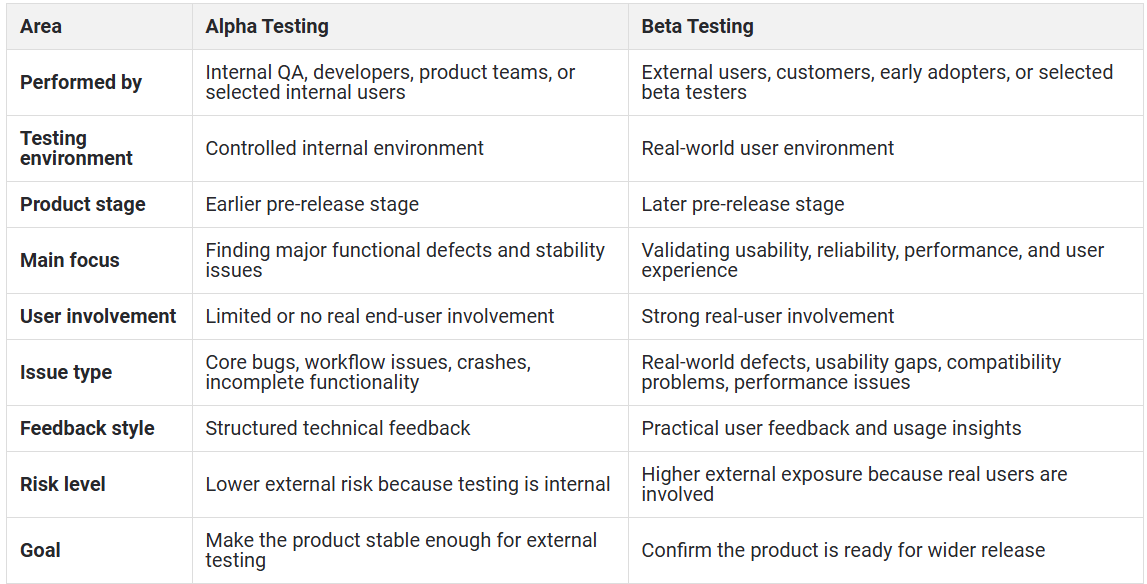
Alpha Testing vs Beta Testing
Alpha and beta testing are both pre-release validation stages, but they serve different purposes.
Who Performs Beta Testing?
Beta testing is performed by users outside the core development and QA team. The exact tester group depends on the product.
Common beta testers include:
Existing customers
Early adopters
Target users from specific regions
Employees outside the product team
Power users
Community members
Client stakeholders
Subject matter experts
Usability testers
Pilot customers
For enterprise software, beta testers may include selected customers or internal business users. For consumer apps, beta testers may include early-access users, community members, or users from specific device and OS groups.
The most useful beta tester is not always the most technical person. In many cases, the best feedback comes from users who behave naturally and reveal where the product feels confusing, slow, incomplete, or unreliable.
How to Create an Effective Beta Testing Strategy
A beta test should not begin with “let’s send the app to a few users and see what happens.” That usually leads to scattered feedback and weak decisions.
A strong beta testing strategy should include the following steps.
1. Define the purpose
Start by deciding what you want to learn. Are you testing stability? Usability? Feature adoption? Performance? Compatibility? Market readiness?
Clear goals make feedback easier to interpret.
2. Choose the right beta audience
Your beta testers should reflect your actual users. A fintech app should include users with different devices, banks, network conditions, and transaction habits. A media app should include users across devices, screen sizes, network speeds, and playback preferences.
3. Set entry criteria
Do not start beta testing too early. The product should be stable enough for external users. Entry criteria may include:
All critical internal bugs fixed
Core workflows completed
Basic security checks passed
Crash reporting enabled
Feedback channels ready
Known issues documented
Support team prepared
4. Define test scope
Beta testers should know what to focus on. For example:
Create an account
Complete onboarding
Search for a product
Make a payment
Upload a document
Stream a video
Change account settings
Use the app on mobile data
Test push notifications
5. Prepare feedback channels
Make feedback easy. Users should not have to write long technical reports. Provide simple ways to submit bugs, screenshots, recordings, comments, and ratings.
6. Track objective and subjective data
Feedback alone is not enough. Combine user comments with crash reports, logs, performance metrics, session data, and usage analytics.
Firebase Crashlytics, for example, provides real-time crash reporting and helps teams track, prioritize, and fix stability issues.
7. Prioritize issues clearly
Not every beta issue should block release. Group issues by severity, frequency, business impact, and user impact.
8. Communicate with testers
Keep testers informed. Tell them what changed, what was fixed, and what still needs feedback. Engaged testers provide better input.
9. Set exit criteria
A beta test should end when release criteria are met, not just when the calendar runs out. Exit criteria may include crash-free targets, critical bug closure, usability acceptance, performance thresholds, and stakeholder approval.
Key Metrics to Track During Beta Testing
Good beta testing needs both qualitative feedback and quantitative data. Metrics help teams avoid relying only on opinions.
1. Crash rate
Track how often the product crashes and which devices, OS versions, or workflows are involved.
2. Session stability
Measure whether users can complete sessions without interruptions, freezes, forced exits, or blocking errors.
3. Bug severity
Categorize defects as critical, high, medium, or low. A small number of critical bugs can matter more than a large number of minor UI issues.
4. Bug frequency
Track how often the same issue appears. Repeated feedback from multiple testers usually indicates a real pattern.
5. Task completion rate
Measure whether users can complete key workflows, such as signup, login, payment, search, checkout, upload, booking, or playback.
6. Time to complete key tasks
If users take too long to finish a flow, the product may have usability or performance issues.
7. App launch time
For mobile apps, slow startup can damage first impressions. Track launch time across real devices and network conditions.
8. Screen load time
Measure how long important screens take to load, especially checkout, payment, content playback, dashboard, profile, or search pages.
9. Network performance
Track latency, packet loss, throughput, and response times where relevant. Network behavior can strongly influence mobile and media experiences.
10. Battery, CPU, and memory usage
High resource consumption can affect user experience, especially on older or mid-range devices.
11. Feedback volume
Track how many testers submit feedback, how often they report issues, and which workflows generate the most comments.
12. Tester engagement
Monitor active testers, completed tasks, session frequency, and response rates.
13. Release confidence score
Some teams create a readiness score by combining crash rate, open critical bugs, test coverage, feedback sentiment, and performance metrics.
Common Challenges in Beta Testing
Beta testing is valuable, but it can be difficult to manage without the right process.
1. Finding the right testers
A large beta group is not always useful. The real challenge is finding testers who match your target audience and will provide meaningful feedback.
2. Low tester engagement
Many testers install a beta build but never use it properly. Clear tasks, reminders, and simple feedback channels help improve participation.
3. Unclear feedback
Users may report issues vaguely. For example, “the app is slow” may refer to launch time, screen load time, network delay, animation lag, or backend response time.
4. Device and OS fragmentation
Mobile apps may behave differently across device models, OS versions, chipsets, screen sizes, and manufacturer-level customizations.
5. Network variability
A product may work well on office Wi-Fi but fail under weak cellular networks, roaming conditions, high latency, or packet loss.
6. Duplicate bug reports
Multiple testers may report the same issue in different ways. Teams need triage systems to group and prioritize duplicate reports.
7. Privacy and compliance risks
Beta builds may expose unfinished features, sensitive data, or confidential workflows. Access control, data masking, and secure distribution are important.
8. Hard-to-reproduce bugs
Some beta issues appear only under specific conditions. Without logs, session evidence, device details, and network data, teams may struggle to reproduce them.
9. Overreacting to feature requests
Beta testers may request features that do not align with the product strategy. Teams should separate defects from preferences and roadmap suggestions.
Best Practices for Successful Beta Testing
A successful beta test is structured, focused, and easy for testers to participate in.
1. Start with clear goals
Every beta test should answer specific questions. For example:
Is the app stable on target devices?
Can users complete the payment flow?
Does onboarding make sense?
Does video playback remain stable on mobile data?
Are push notifications working as expected?
2. Keep the tester group relevant
Choose testers who reflect real users. Include different devices, OS versions, regions, user skill levels, and network conditions.
3. Provide simple instructions
Do not overwhelm testers with long documentation. Give them short task lists, known limitations, reporting steps, and expected timelines.
4. Make feedback easy
Use in-app feedback, short surveys, screenshots, logs, or guided forms. The harder it is to report issues, the less feedback you will receive.
5. Monitor technical data
Do not rely only on user comments. Track crashes, logs, device behavior, performance metrics, and network data.
6. Prioritize real user impact
Fix issues that block core workflows, damage trust, affect performance, or create confusion.
7. Communicate regularly
Tell testers when new builds are available, what changed, and which areas need more feedback.
8. Protect user data
Avoid exposing sensitive production data in beta environments. Use access controls and clear data handling practices.
9. Test across real environments
Beta testing becomes more useful when it reflects the environments users actually experience. This includes real devices, real networks, different geographies, and varied user conditions.
Importance of Real Device Testing in Beta Testing
Real device testing is critical in beta testing because user experience is shaped by more than application code. Device hardware, OS behavior, network quality, screen size, battery health, background apps, and carrier conditions can all affect how the product performs.
Emulators and simulators are useful during development, but they cannot fully reproduce real-world conditions. They may miss issues related to:
Touch responsiveness
Device-specific UI behavior
Camera, GPS, microphone, or biometric functions
Battery consumption
Thermal throttling
Push notification behavior
Real carrier networks
Manufacturer-specific OS changes
Low memory conditions
App behavior on older devices
For mobile, OTT, fintech, gaming, eCommerce, and media apps, real device testing helps teams catch problems before users do.
This matters even more during beta testing. A beta tester may report that a checkout button “doesn’t work,” but the root cause may be device lag, API latency, a dropped network request, a rendering issue, or an OS-specific bug. Real device testing helps teams move from vague feedback to actual root cause analysis.
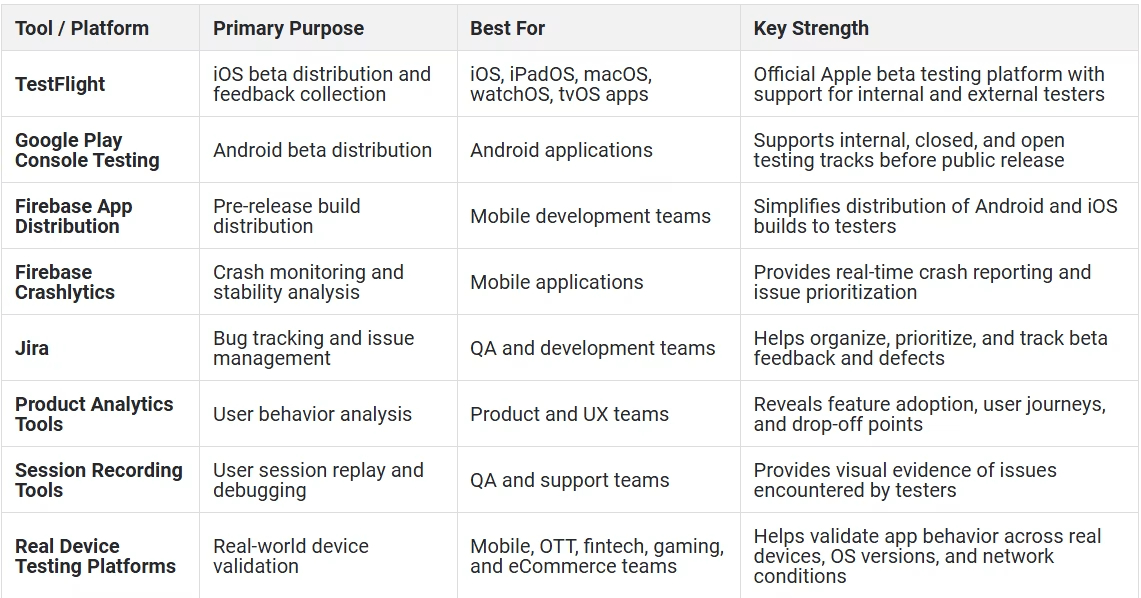
Top Beta Testing Tools and Platforms
Beta testing usually requires a mix of distribution, monitoring, feedback, analytics, bug tracking, and real-device validation tools.
1. TestFlight
TestFlight is Apple’s official beta testing tool for iOS, iPadOS, macOS, tvOS, watchOS, and visionOS apps. It allows teams to invite internal and external testers, distribute beta builds, and collect feedback before App Store release. Apple’s documentation states that external beta testing can support up to 10,000 testers per app.
2. Google Play Console testing tracks
Google Play Console supports internal, closed, and open testing tracks. Internal testing is useful for fast QA checks, while closed and open testing help teams validate pre-release Android builds with selected or broader audiences. Google’s documentation also notes that internal testing can distribute an app to up to 100 testers for initial quality assurance checks.
3. Firebase App Distribution
Firebase App Distribution helps teams distribute pre-release iOS and Android builds to trusted testers. It is useful for managing tester access, sending builds quickly, and collecting feedback across mobile app releases.
4. Firebase Crashlytics
Firebase Crashlytics helps teams monitor crashes and stability issues in real time. During beta testing, this can help teams understand which crashes are affecting testers and which builds are stable enough for release.
5. Bug and issue tracking tools
Bug tracking tools help teams capture, assign, prioritize, and resolve issues reported during beta testing. Jira, for example, supports bug capture, tracking, resolution, and reporting across development workflows.
6. In-app feedback tools
In-app feedback tools allow testers to report bugs, submit comments, attach screenshots, and share contextual information without leaving the product.
7. Product analytics tools
Analytics tools help teams understand how beta users interact with the product. They can show user journeys, feature adoption, drop-off points, and engagement patterns.
8. Session recording tools
Session recordings help teams review what happened before an issue occurred. This is useful when tester feedback is unclear or incomplete.
9. Real device testing platforms
Real device testing platforms help teams validate beta builds across real devices, OS versions, browsers, and network conditions. This is especially important for mobile apps, streaming platforms, banking apps, gaming apps, and other digital products where device and network behavior directly affect user experience.
Top Beta Testing Tools and Platforms
Advantages of Beta Testing
Beta testing gives teams practical insights that internal testing alone may not provide.
1. Improves product quality
Beta testing helps identify defects, usability problems, performance issues, and compatibility gaps before launch.
2. Reduces release risk
A controlled beta limits exposure. Teams can fix serious issues before they reach the full user base.
3. Captures real user feedback
Beta testers reveal how real users understand, use, and respond to the product.
4. Improves usability
Feedback from beta users can help simplify workflows, clarify messaging, reduce friction, and improve onboarding.
5. Validates performance in real conditions
Beta testing helps teams see how the product behaves across devices, networks, and user environments.
6. Supports better prioritization
Beta feedback helps teams decide which issues must be fixed before release and which improvements can move to the roadmap.
7. Builds early user trust
A well-run beta program can make early users feel involved and heard.
8. Helps product-market fit
Beta feedback can reveal whether the product solves the right problem in the right way for the target audience.
Disadvantages of Beta Testing
Beta testing is valuable, but it has limitations.
1. Feedback can be inconsistent
Different testers may describe the same problem in different ways. Some may provide detailed feedback, while others may submit vague comments.
2. Tester engagement may be low
Not every invited tester will actively participate. Teams often need reminders, incentives, and simple feedback flows.
3. It can delay release
If beta testing reveals serious issues, teams may need to extend timelines.
4. It may expose unfinished product experiences
Even controlled beta releases can shape user perception. Poor beta experiences may affect trust if expectations are not managed.
5. Data can be noisy
Beta feedback may include personal preferences, duplicate reports, unrelated complaints, or feature requests that do not align with the release scope.
6. It does not replace QA
Beta testing should not be used as a substitute for functional, regression, security, performance, accessibility, or compatibility testing.
Real-World Examples of Beta Testing
Example 1: Mobile banking app beta test
A banking team is preparing to release a redesigned payments flow. Internal QA confirms that login, OTP, beneficiary selection, transfer confirmation, and receipt generation work correctly.
During beta testing, users on older Android devices report delays after tapping “Confirm Payment.” Some users tap twice because they are unsure whether the payment is processing.
The issue is not a simple functional bug. It is a user confidence problem caused by slow feedback in a critical flow. The team improves loading indicators, validates response time, and tests the flow across real devices and network conditions before launch.
Example 2: Streaming app beta test
A media company launches a beta version of its streaming app with a redesigned playback experience. Beta testers report that playback works well on Wi-Fi but buffers frequently on mobile data.
The team reviews device and network data and discovers that startup delay and buffering increase under specific network conditions. The team optimizes playback startup, tests across multiple devices, and validates performance before wider release.
Future Trends in Beta Testing
Beta testing is becoming more continuous, data-driven, and integrated into release workflows.
1. AI-assisted feedback triage
AI will increasingly help teams group duplicate feedback, identify sentiment patterns, summarize tester comments, and prioritize issues based on user impact.
2. Continuous beta programs
Instead of running beta testing only before major launches, more teams will maintain ongoing beta groups for continuous validation of new features.
3. Feature flag-driven beta releases
Feature flags will make it easier to expose specific features to selected users without releasing the entire product broadly.
4. More focus on real-device intelligence
As device ecosystems become more fragmented, teams will need stronger visibility into device-specific and network-specific behavior.
5. Stronger privacy controls
Beta programs will need better controls around test data, consent, access, confidentiality, and compliance.
6. Accessibility-focused beta testing
Teams will increasingly include users with different accessibility needs to validate whether products work for a broader audience.
7. Performance-led beta decisions
Beta testing will move beyond “users liked it” and focus more on measurable readiness, including stability, responsiveness, resource usage, and journey completion.
How HeadSpin Helps Improve Beta Testing
HeadSpin helps teams improve beta testing by giving them visibility into how apps perform on real devices, real networks, and real user conditions before full release.
Beta feedback often tells teams what went wrong. HeadSpin helps teams investigate why it went wrong.
1. Real device access for beta validation
HeadSpin provides access to real devices across different OS versions, device models, and network conditions. This helps teams validate beta builds in environments closer to what users experience after launch.
HeadSpin’s mobile app testing solution supports functional and performance validation, 130+ KPIs, real-device access, and flexible deployment models.
2. Global testing coverage
Beta issues can vary by region, carrier, device availability, and network quality. HeadSpin’s global device infrastructure helps teams test across real devices, operating systems, and network conditions. Its infrastructure page also highlights support for 60+ automation frameworks, including Appium and Selenium.
3. Performance visibility beyond user feedback
A beta tester may say, “The app feels slow.” HeadSpin helps teams look deeper by tracking KPIs such as app launch time, screen load time, network behavior, CPU usage, memory consumption, and other performance indicators.
4. Reproducing real-world issues
Hard-to-reproduce beta issues are easier to investigate when teams have session data, device details, network metrics, logs, and performance insights. This helps reduce guesswork during triage.
5. Support for manual and automated testing
Teams can use HeadSpin to support both exploratory/manual validation and automated test execution. This is useful when beta testing reveals a critical issue and QA teams need to verify the fix across multiple devices and environments.
6. Better release confidence
By combining real-user beta feedback with real-device performance data, teams can make stronger release decisions. Instead of relying only on subjective tester comments, teams can review objective data and identify whether the product is ready for launch.
Conclusion
Beta testing is one of the most practical ways to understand whether a product is ready for real users. It helps teams move beyond internal assumptions and validate the product in real-world conditions.
A strong beta testing process can uncover missed defects, improve usability, validate performance, reduce launch risk, and build confidence before release. But beta testing works best when it is structured. Teams need clear goals, the right testers, strong feedback channels, objective metrics, and real-device validation.
For mobile and digital experience teams, this is especially important. Users interact with products across different devices, networks, regions, and usage patterns. A product that works well in one environment may struggle in another.
HeadSpin helps teams strengthen beta testing by providing real-device access, global infrastructure, performance insights, automation support, and detailed KPI visibility. With the right beta testing strategy and real-world validation, teams can launch with fewer surprises and stronger confidence.
Originally Published:- https://www.headspin.io/blog/beta-testing-all-you-need-to-know


